PROJECT_03

Ya lávame — Punto de venta
Touch point of sale for a car wash: it came to replace the notebook they charged with.
- TYPE
- Desktop · Point of sale
- STATUS
- IN PRODUCTION
- DIAGRAMS
- 4
- SCREENSHOTS
- 3
YaLavame_Setup_1.3.0.exe Windows · no Python required
01 What it is
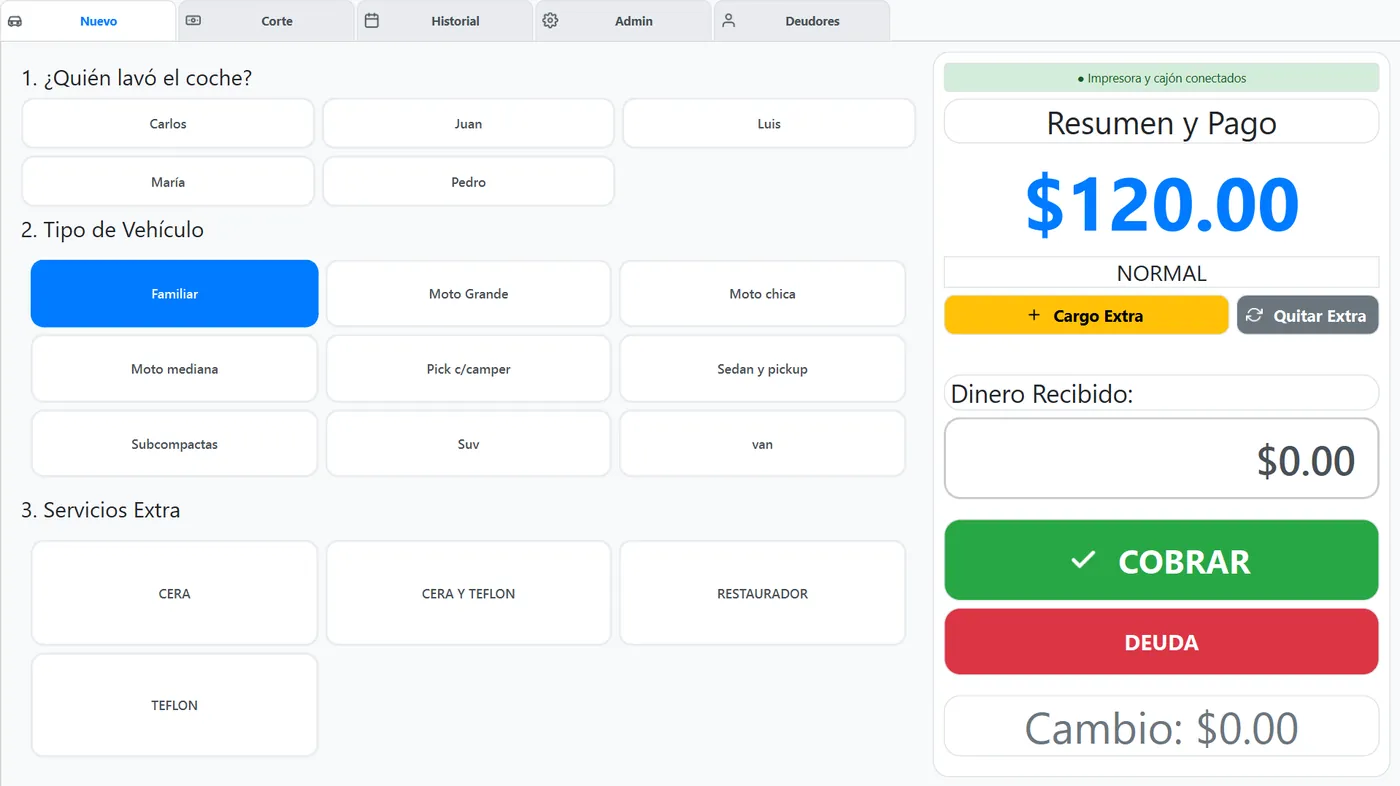
A touch point of sale for a car wash, in production. It replaces charging by notebook with a complete flow: pick who washed, which vehicle and which services, charge, print the ticket on the thermal printer and open the drawer. It is built to run with a finger on a touch screen, no keyboard or mouse, so any employee can use it without explanation.
- A single desktop app in Python + PySide6 (Qt 6) with a local SQLite database: no server, no internet, no configuration.
- Five tabs: New (charge), Cash count, History, Debtors and Admin (the latter behind a password).
- ESC/POS ticket with logo, hardware drawer opening and five ways to connect the printer.
- Windows installer with kiosk-mode autostart; the same core runs on Linux.
02 Charging a service
This is the screen the terminal lives on all day. Everything is big cards; there are no hidden menus or fields that need a physical keyboard.
- Tap the worker who handled the car. The list comes from Admin → Workers.
- Tap the vehicle type: sedan, SUV, pickup, motorcycle… Each has its base price in the catalogue.
- Tick the extras done (wax, teflon, restorer…). The total is recalculated instantly.
- Type what the customer paid on the on-screen numeric keypad; the app works out the change.
- Tap Charge: it is saved to the history, the ticket comes out and the drawer opens. If the customer will owe it, tap Assign debt and pick the debtor instead of charging.
03 The other screens
| Tab | What for | Detail |
|---|---|---|
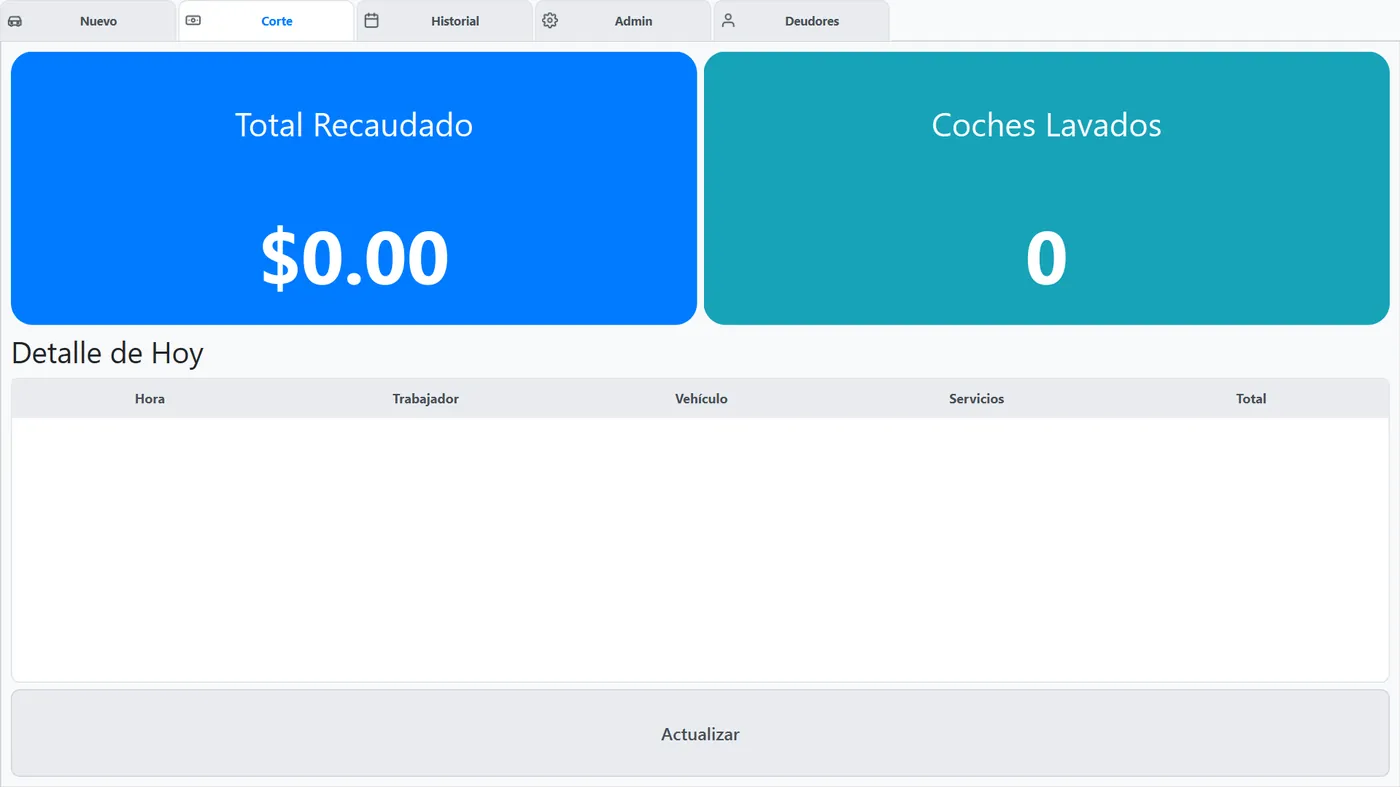
| Cash count | Closing count | Total takings, cars washed and the detail of every service of the day, per worker |
| History | Look up previous days | Every wash with date, worker, vehicle, service, cost, paid and change |
| Debtors | Customers who pay later | Create with initial debt, add debt, record a payment, payment history and delete; amounts can be hidden with a button when people are watching |
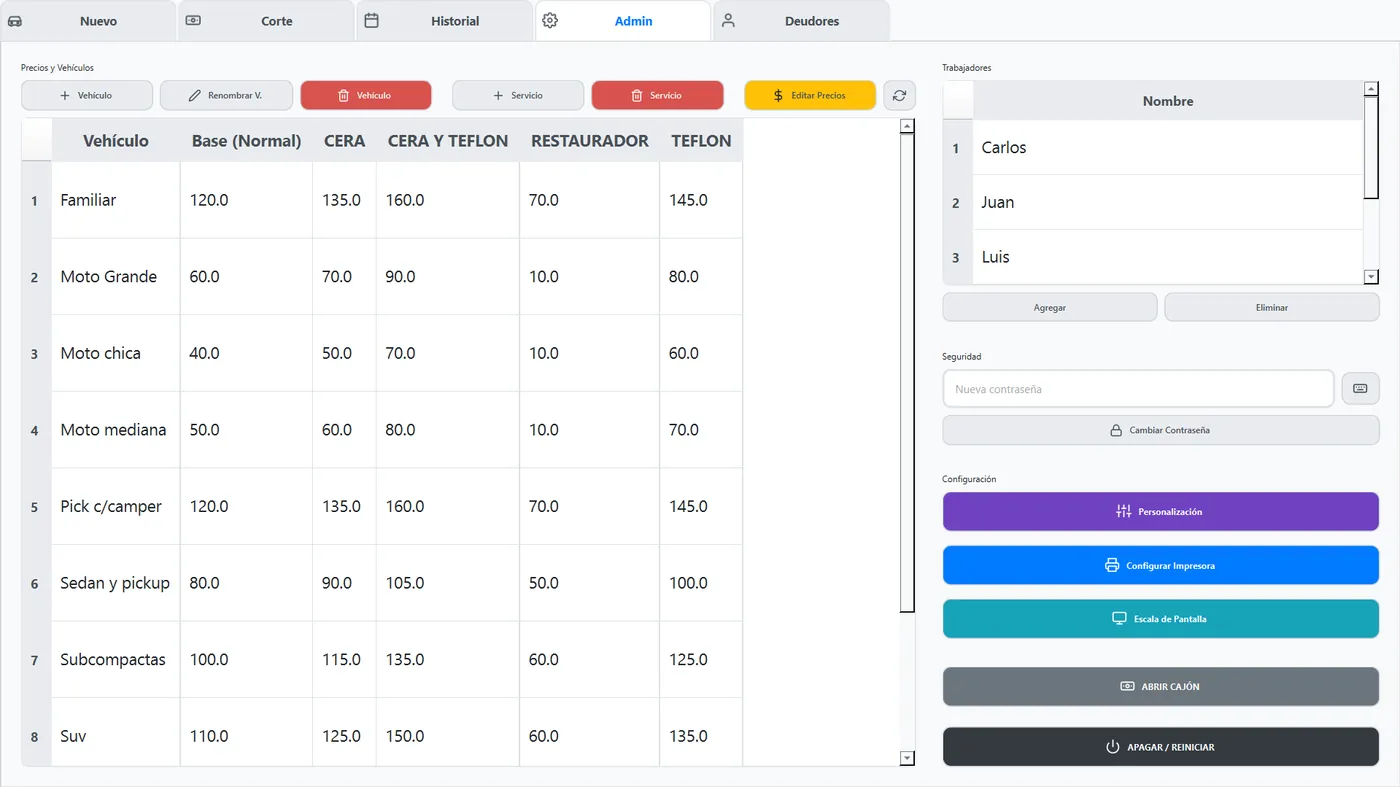
| Admin | Password only | Prices per vehicle and service, workers, password change, business name and ticket footer, printer, screen scale and drawer |
On first launch the app asks for the business name and the administrator password the owner chooses; there is no factory password in production. If it is lost, scripts/fix_password.py resets it from the machine.
04 Printing and drawer
The ticket is not "printed" as a document: it is built with low-level ESC/POS commands through python-escpos, and the same code works for any way of connecting the printer. The logo goes rasterized to the paper width; the business name and the total in double height and width; at the end, paper cut and, if enabled, the drawer kick sequence (ESC p) that opens the drawer.
| Mode | When | What it needs |
|---|---|---|
windows | Printer installed in Windows (default) | The spooler name, e.g. POS-58; goes through pywin32 |
serial | Serial or USB-serial port | Port (COM3, /dev/ttyUSB0) and baud rate (9600) |
network | Network printer | IP and port, usually 9100 |
usb | Direct USB, no driver | Vendor and product id (0x0416 / 0x5011); needs libusb |
file | Diagnostics | Writes the ESC/POS bytes to a file to inspect them |
- 58 mm (384 dots) or 80 mm (576 dots) paper; the width decides how much the logo is scaled.
- Test print and Test connection buttons in Admin → Printer, to get the terminal ready before putting it on the counter.
- The drawer can also be opened by hand from Admin, without printing anything.
- If the printer does not support auto cut, the ticket ends with three line feeds instead of failing.
05 Touch interface
- Kiosk mode: starts full screen with its own password login and on-screen keyboard; nothing of the Windows bar is visible.
- Own numeric and alphanumeric keyboards as Qt components, so it does not depend on the system touch keyboard.
- Automatic scaling: the factor comes from the screen height against a baseline and is clamped between a minimum and a maximum, with a margin so the bottom buttons do not overflow on small screens. From Admin it can be set by hand for 13" or very large monitors, and card size is adjusted separately.
- Forced light theme with its own palette: it looks the same even if Windows is in dark mode, with no invisible text. The whole look lives in one central Qt style sheet (QSS).
- Vector SVG icons generated in code, sharp at any resolution.
06 Data
Everything lives in one SQLite file, lavado.db. The data layer (database.py) is the only thing that touches it; screens read and write through it. On first launch, if the previous version historial_lavados.json exists, it is imported into the history table without the user doing anything.
| Table | What it stores |
|---|---|
configuracion | Key-value: business name, admin password, ticket footer, printer, scale |
servicios | Price per (categoria_vehiculo, tipo_servicio), unique per pair |
historial | Every wash: date, worker, vehicle, service, cost, paid and change |
trabajadores | Unique staff names |
deudores · pagos_deudores | Total debt per customer and every payment with date and amount |
07 Install and build
On the counter goes the Windows installer (button above): it needs no Python. It creates shortcuts and, if ticked, autostart at login so the terminal boots straight into the point of sale.
> pip install -r requirements.txt           # PySide6, pywin32, python-escpos, pyserial, Pillow
> python src\main_qt.py                     # o doble clic en inicio.bat; en Linux: ./run_app.sh
> build_installer.bat                       # 1) PyInstaller con SistemaAutolavado.spec  2) Inno Setup con installer\YaLavame.iss
> # resultado: installer\output\YaLavame_Setup_1.3.0.exe- Paths to
data/andassets/resolve against the project root, or next to the.exewhen running packaged (sys.frozen): it works from any folder. - The core is cross-platform: Qt and SQLite run the same on Windows and Linux; on Linux you just pick a serial, network or USB printer instead of the spooler.
- To keep data when reinstalling, copy the previous
lavado.dbinto the data folder after installing.
DIAGRAMS
SCREENSHOTS